Reviews influence both where your practice gets found and whether patients choose you. Reputation Builder makes asking for a review part of every visit, with HIPAA-conscious requests your staff send in one tap, a direct Google review link and QR code, and a dashboard that shows your rating grow.
Your star rating and review count do double duty. To Google, they’re a core prominence signal that helps decide who appears in the Map Pack. To patients, they’re the deciding factor: faced with three practices, people overwhelmingly choose the one with more reviews and a higher rating, often without reading a single word of them.
Yet most practices treat reviews as an afterthought, hoping a happy patient happens to leave one. The result is a slow trickle, the occasional unhappy outlier with too much weight, and a rating that never reflects the quality of care being delivered. The Reputation Builder turns that from luck into a system.
The short version
Reviews are one of the most valuable local signals you can actively grow, strengthening both visibility and patient trust.
The mechanism
How the Reputation Builder works
The platform makes asking easy for your team and leaving a review easy for your patients, so it becomes a habit instead of an afterthought.
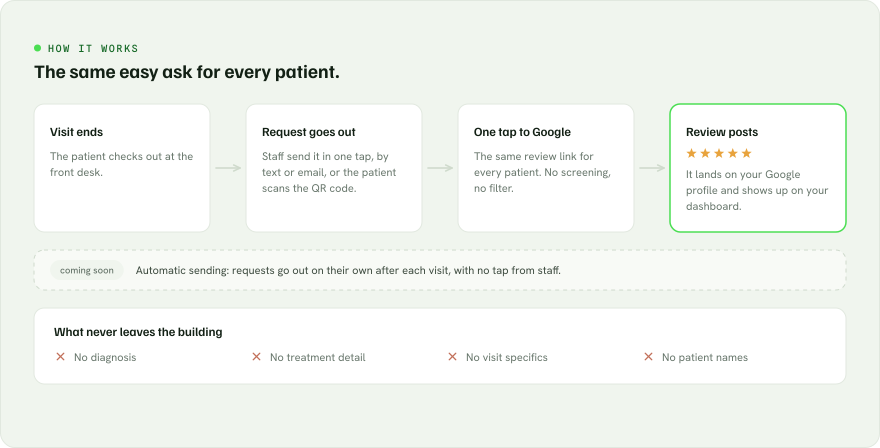
One-tap requests. Staff send a friendly review request by text or email from the platform in a single tap, right at checkout.
Review link and QR code. A direct link to your Google review form, plus a QR code for checkout cards and signage, so patients can leave a review whenever it suits them.
One-tap to Google. The path from invitation to a posted review is as short as possible, because every extra step loses people.
Fits your workflow. The system works alongside how your front desk already operates; no disruptive new process to adopt.
Every patient gets the same link straight to Google. No screening, no detours.
Timing
Reaching patients at the moment they’re happiest
A review request sent at the wrong time gets ignored. Sent right after the visit, while the experience is still fresh, it gets answered far more often. That’s why requests go out from the front desk at checkout, the moment patients are most likely to respond.
Consistency matters too. A steady flow of recent reviews helps demonstrate an active practice and gives prospective patients a more current picture of the patient experience.
Playing by Google’s rules
Ask every patient, the same way
Some review tools ask patients how their visit went first, then send only the happy ones to Google and steer everyone else to a private form. That’s called review gating, and Google’s policies prohibit it. Practices caught doing it can lose those reviews and put their profile at risk.
Reputation Builder doesn’t gate. Every patient gets the same request and the same direct link to Google, whatever their experience. That keeps your profile safe, and a steady flow of honest reviews from your whole patient base builds a rating prospective patients actually believe.
When a review does raise a concern, the right move is a prompt, privacy-safe public reply and a direct conversation with the patient. Our guide to handling a negative Google review walks through it.
Healthcare-specific
HIPAA-conscious by design
Collecting reviews in healthcare is not the same as collecting them for a restaurant. A request that references a procedure or a message that confirms someone was treated can create compliance exposure. The Reputation Builder is built for this from the ground up.
Requests never reference diagnoses, treatments, or any protected health information.
Workflows are designed to fit inside your existing patient-communication practices.
Your staff choose when each request goes out, so nothing is sent without your team’s knowledge.
Visibility
A clear view of your reputation
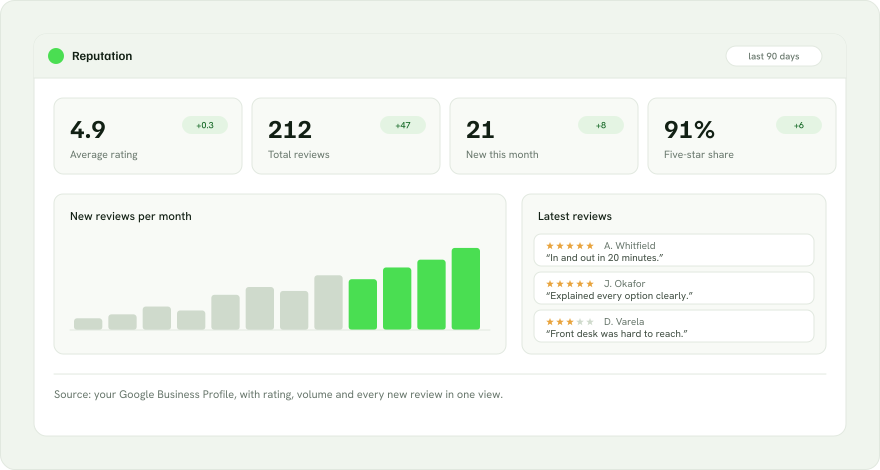
You shouldn’t have to wonder how you’re doing. A dashboard shows your rating over time, your review volume, and new reviews as they arrive, so the impact is something you can see, not just trust.
#1
Reviews are the leading local prominence signal
1 view
Dashboard of rating, reviews & trends
1 link
The same Google review link for every patient
Your rating, review volume and newest reviews in one view.
On the roadmap
Coming soon: automatic sending
Today, your team sends each request in one tap. Next, Reputation Builder will send requests on its own after each visit, so no one has to remember to ask. Every patient will still get the same request and the same link to Google.
Deliverables
What you get
One-tap review requests
Friendly, HIPAA-conscious requests your staff send by text or email in a single tap.
Review link & QR code
A direct Google review link and QR code for checkout cards, signage, and follow-ups.
Reputation dashboard
Your rating, new reviews, and growth over time in one view.
Automatic sending (coming soon)
Requests that go out on their own after each visit, with no tap from staff.
Questions
Reputation Builder, answered
How do you handle patient privacy in review requests?
Our workflows are HIPAA-conscious by design. Review requests never reference diagnoses, treatments, or any protected health information, and the process fits inside your existing patient communication practices. We walk through the details on the strategy call.
Can we send only happy patients to Google?
No, and we won’t set it up that way. Screening patients first and sending only the satisfied ones to Google is called review gating, and Google’s policies prohibit it. Every patient gets the same request and the same link, which keeps your profile safe and builds a rating patients trust.
Will this create more work for my front desk?
Very little. Sending a request takes one tap at checkout, and the QR code lets patients leave a review on their own. Automatic sending, coming soon, will take even that step off your team’s plate.
How quickly will my rating improve?
Results vary based on your existing review volume, patient traffic, response rates, and current rating. Because asking becomes part of every visit, the goal is to build a consistent flow of recent patient feedback and strengthen your reputation over time.
Get Started
Make your reviews work for you.
Book a free 30-minute strategy call. We’ll review your current rating, review volume, and local competitive landscape, then show you how Reputation Builder can help systematically strengthen your reputation with less work from your staff.