We’ve written before about how a beautiful site can still rank nowhere because of its structure. Speed is the close cousin of that problem: even a well-structured site bleeds patients and rankings if it’s slow. And because you experience your own site under the best possible conditions, slowness is the issue you’re least likely to notice yourself.
Why speed is both a patient problem and a ranking problem
For patients, the math is brutal: a meaningful share of visitors abandon a page that takes more than about three seconds to load, and the odds of a bounce climb fast with every additional second. A patient in pain or in a hurry has no patience for a spinner.
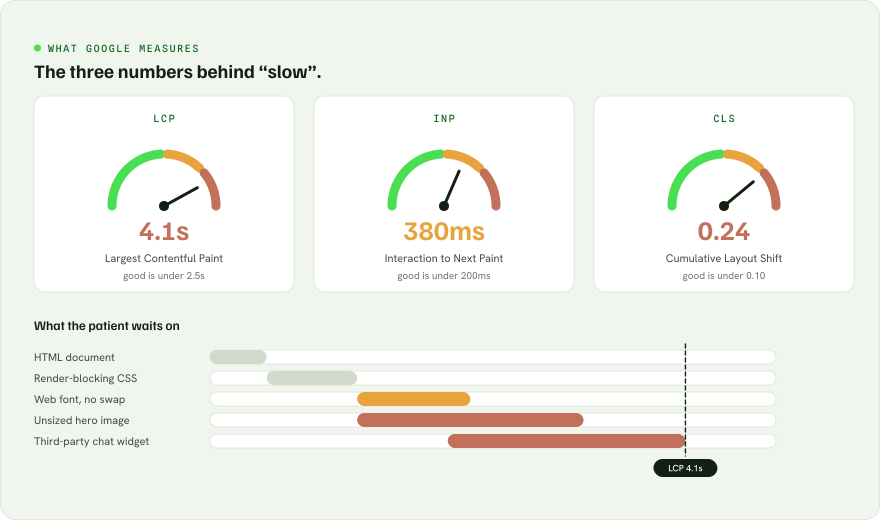
For Google, speed is a measured ranking input through Core Web Vitals, a set of metrics for how fast the page shows content, how quickly it responds to taps, and how stable it is as it loads. Slow sites get quietly demoted, especially on mobile, where most patient searches happen.
The usual culprits
When a practice site is slow, it’s almost always some combination of these:
- Huge, unoptimized images. A single photo straight off a phone or stock site can weigh several megabytes. Multiply that across a page and mobile users wait, and wait.
- Too many scripts and trackers. Chat widgets, multiple analytics tags, social embeds, booking pop-ups: each adds weight and delay. They accumulate quietly over the years.
- Bloated page-builder themes. Drag-and-drop builders are convenient but often ship enormous amounts of code to render a simple page.
- Cheap or overloaded hosting. Bargain shared hosting can leave your site waiting in line behind hundreds of others on the same server.
- No caching or CDN. Without caching and a content delivery network, every visitor triggers the slow path and distant visitors wait longer.
- Layout shift. When content jumps around as the page loads (images pushing text down, buttons moving under a thumb), it frustrates patients and hurts your scores.
How to tell if you actually have a problem
Don’t trust the view from your laptop. Instead:
- Run your most important pages through a free tool like Google’s PageSpeed Insights and look at the mobile score and Core Web Vitals, not just desktop.
- Open your site on your phone on cellular data, not office Wi-Fi, and count the seconds until you can actually read and tap.
- Watch what happens as it loads. Does content jump around? Does the page feel like it settles, or fight you?
If those checks make you wince, your visitors are wincing too, and leaving.
The fastest website in your market has an invisible advantage: every patient who would have bounced from a slower one.
What good looks like
A fast practice site is built lean from the start: properly sized and compressed images, a minimal set of scripts that each earn their place, solid hosting with caching and a CDN, and a foundation that doesn’t ship bloated code to render a clean page. It passes Core Web Vitals on mobile, and it feels instant to a patient on a phone.
That’s exactly how we build the LaunchMD Framework site: performance isn’t a cleanup task we get to later, it’s baked into the foundation, because a site that loads in a blink keeps the patients a slow one would have lost.
The bottom line
Speed is the rare problem that hurts you twice: fewer patients stay, and Google ranks you lower for the ones who might have. The frustrating part is how invisible it is from the inside. The reassuring part is that it’s measurable and fixable. Test your site the way your patients actually experience it, and you’ll usually find the leak hiding in plain sight.